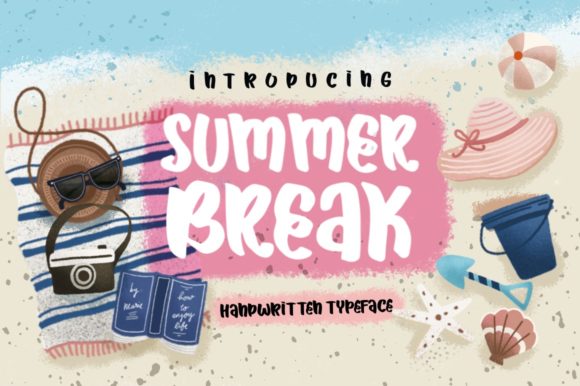
Summer Break: A Handwritten Font That Fits Real Workflows
Summer Break isn’t just another decorative typeface—it’s a lightweight, expressive handwritten font with a gentle, whimsical rhythm that feels intentional rather than incidental. Its lowercase letters have subtle bounce and warmth; its capitals carry quiet confidence without stiffness. Designed for readability at moderate sizes and visual charm at larger ones, Summer Break bridges the gap between personality and practicality. It doesn’t shout—it invites. And that makes it unusually versatile in real-world creative and professional workflows.
Where Summer Break Fits in the Creative Process
Most fonts enter a project at the final stage—polishing headlines or styling a finished layout. Summer Break works earlier and more fluidly. Because of its natural cadence and low visual weight, it integrates well during ideation, mood boarding, and early-stage prototyping. Designers sketch interface copy in Summer Break to test how tone reads before committing to heavier fonts. Educators draft slide titles or handout headers in it to assess whether learning materials feel approachable. Bloggers use it in Notion or Figma wireframes to preview how a personal essay’s voice lands before writing the full draft.
This isn’t about aesthetics alone. It’s about signal alignment: when your font quietly reinforces clarity, warmth, or calm—before you’ve even written the first sentence—you’re shaping context, not just decoration.
Using Summer Break Before a Project Begins
Before launching a branding refresh, course launch, or content series, many creators build a “tone palette”—a small set of assets (colors, textures, type samples) that represent the emotional core of the work. Summer Break often anchors that palette. Its lightness prevents visual fatigue during long planning sessions; its handwritten quality signals authenticity without leaning into overused “hand-drawn” clichés.
Try this: open a blank document and write three key verbs that describe how you want people to feel engaging with your project—e.g., “calm,” “curious,” “unhurried.” Then set those words in Summer Break at 24pt. Does the type support the feeling? If yes, it’s likely a functional fit—not just stylistic.
During Execution: Where Lightness Adds Leverage
During active work—whether designing an email sequence, laying out a zine, or preparing workshop slides—Summer Break excels in roles where hierarchy needs softening, not sharpening. It performs especially well in:
- Subtle emphasis: Use it for pull quotes, short callouts, or section dividers where bold sans-serifs would disrupt flow.
- Personalized touchpoints: Customer onboarding emails, welcome PDFs, or printed thank-you cards gain sincerity without sacrificing legibility.
- Educational scaffolding: In learning modules, it distinguishes instructor notes, reflection prompts, or optional deep-dive asides from core content.
Crucially, Summer Break is not meant for body text at small sizes or dense paragraphs. Its charm lives in restraint: one headline, two lines of caption, three words of emphasis per page. Overuse dilutes its effect—and risks undermining readability. Think of it like a well-placed pause in speech: meaningful because it’s selective.
Compatibility and Technical Integration
Summer Break is available in standard OTF and TTF formats, with full Latin character support and basic OpenType features (ligatures, alternate glyphs). It works reliably in Figma, Adobe Creative Cloud, Canva (via upload), and modern web environments using @font-face. No plugins or special rendering engines required.
For web use, pair it with a neutral, highly legible sans-serif (like Inter, Lato, or Helvetica Neue) for body copy. Set Summer Break at 1.2–1.6rem for headings, and never below 18px in UI contexts. Avoid all-caps usage—it loses its organic flow. Instead, rely on weight contrast (if a bold variant exists) or strategic letter spacing to create distinction.
After the Project: Reinforcing Continuity and Voice
Once a campaign, product, or course goes live, Summer Break continues to serve—not as a one-off flourish, but as a consistent voice marker. Small business owners use it across seasonal social graphics to signal “this is our summer energy,” without changing logos or core branding. Publishers apply it to limited-edition ebook covers or bonus resource PDFs—creating perceived exclusivity through typographic consistency, not novelty.
This kind of post-launch integration depends on intentionality upfront. If Summer Break appears only in one asset—say, a single Instagram carousel—it reads as decorative. But if it reappears in the downloadable workbook, the email subject line, and the “thank you” screen after purchase, it becomes part of a recognizable rhythm. That repetition builds familiarity, not fatigue—provided spacing, sizing, and context remain aligned.
Workflow Integration Tips That Actually Stick
Adopting a new font isn’t about installing it—it’s about building small, repeatable habits around when and how it earns its place. Here’s what works in practice:
- Assign it a role: Name its purpose explicitly—e.g., “Summer Break = reflection prompts only” or “Summer Break = newsletter sign-off lines.” This prevents drift and decision fatigue.
- Build a style snippet: Save a Figma or Sketch symbol, or a Notion template block, with pre-set size, line height, and color. Reuse it instead of reconfiguring each time.
- Batch-test placements: Before finalizing a layout, export three versions—one with Summer Break for headings, one for subheads, one for captions—and compare them side-by-side. See where it adds clarity versus clutter.
- Check contrast early: Its light weight means it can fade on busy backgrounds or low-res screens. Always verify against WCAG AA contrast ratios, especially for digital interfaces.
Long-Term Use: When Whimsy Becomes Reliable
Fonts that feel “fun” often struggle with longevity—they wear out fast in high-frequency applications. Summer Break avoids this by balancing playfulness with structural consistency. The x-height is generous, spacing is even, and letterforms avoid exaggerated quirks that date quickly. That’s why educators return to it year after year for summer reading lists, why indie publishers use it across multiple book series, and why service-based freelancers keep it in their brand kit for seasonal offers.
Sustainability here isn’t about licensing—it’s about usability over time. If Summer Break still feels appropriate six months after first use, it’s likely doing its job: supporting intent, not competing with it.
Real Integration Looks Like This
A marketing consultant uses Summer Break in her quarterly strategy templates—not for data tables or KPI dashboards, but for the “What We’re Letting Go Of This Quarter” section header. It signals permission to release outdated tactics without sounding flippant.
A science educator embeds it in her lab worksheet PDFs—not for instructions, but for the “Try This At Home” margin notes. Students instantly recognize those as optional, low-stakes extensions.
A small-batch candle maker applies it only to ingredient labels and care cards—not the main product tag. Customers associate it with intimacy and attention to detail, not branding noise.
In each case, Summer Break isn’t performing as decoration. It’s functioning as a quiet cue—telling people how to read, how to feel, and where to lean in. That’s workflow integration: not adding steps, but making existing ones more precise.
When you choose Summer Break, you’re not choosing a look—you’re choosing a pacing device, a tonal anchor, and a small but deliberate way to humanize process. It won’t solve structural problems in your workflow. But it will make the parts that involve connection, reflection, and invitation land with more grace—and that, over time, compounds.