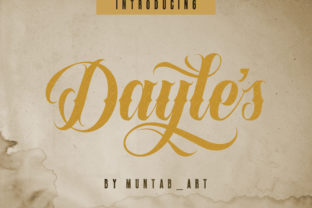
Dayles: Bold Handwritten Font That Stands Out
Dayles isn’t just another script font—it’s a confident, expressive handwritten typeface designed to add warmth, energy, and personality to your work. With its strong strokes, subtle flourishes, and natural rhythm, Dayles feels both hand-drawn and carefully crafted. It doesn’t try to mimic calligraphy perfectly; instead, it embraces the charm of human imperfection while staying highly legible and versatile.
What Makes Dayles Different From Other Handwritten Fonts?
Most handwritten fonts fall into one of two categories: ultra-thin and delicate, or overly decorative and hard to read at smaller sizes. Dayles sits comfortably in the middle—bold enough to command attention, yet balanced enough to work across many contexts. Its letters have generous spacing, clear letterforms, and thoughtful connections that guide the eye smoothly from word to word.
Unlike scripts that rely heavily on swashes or ligatures to feel “authentic,” Dayles builds character through weight, contrast, and intentional irregularity. A capital A might tilt slightly left, a lowercase g has a soft loop—not random, but purposeful. These details make text feel alive without sacrificing usability.
Where Dayles Fits Into Real Creative Work
Whether you’re designing a café menu, launching an online course, or branding a small business, Dayles brings visual clarity and emotional resonance. Its bold nature means it works beautifully as a headline or logo—but it also scales well for subheadings, social media graphics, or even short body text in print brochures or digital newsletters.
Here are a few realistic examples:
- A freelance photographer uses Dayles for her website hero banner—“Capturing Moments, Telling Stories”—and pairs it with a clean sans-serif for supporting text. The contrast feels modern and personal.
- A teacher creates classroom posters with Dayles for motivational quotes (“You’ve Got This!”), making them feel encouraging rather than clinical.
- A small-batch candle maker prints Dayles on product labels and Instagram posts—its friendly strength reinforces her brand voice without looking generic.
- A blogger adds Dayles to Pinterest quote pins and email headers, helping her content stand out in crowded feeds where uniformity is the norm.
Why Designers and Non-Designers Both Reach for Dayles
You don’t need design experience to use Dayles effectively. Because it’s built with readability and real-world application in mind, it avoids common pitfalls like cramped spacing or confusing letter combinations (think fi, fl, or ct pairs). Most applications—including Canva, Adobe Express, Figma, and even Google Docs via webfont embedding—handle Dayles smoothly.
For professionals, Dayles saves time. Instead of layering textures, adjusting kerning manually, or hunting for the “right” script that doesn’t clash with their layout, they drop in Dayles and get consistent, polished results. For beginners, it removes guesswork—no need to overthink pairing or hierarchy when the font itself carries so much presence.
How to Use Dayles Thoughtfully (Not Just Loudly)
Bold doesn’t always mean “biggest” or “most.” Dayles shines brightest when used with intention. Try these practical tips:
- Lead with contrast. Pair Dayles with a neutral, well-proportioned sans-serif (like Inter, Poppins, or Montserrat) for balance. Avoid other decorative fonts nearby—they’ll compete instead of complement.
- Respect hierarchy. Use Dayles for main headlines and short phrases only. Save body copy for fonts designed for extended reading.
- Test legibility early. Preview how Dayles looks on mobile screens, printed materials, and different backgrounds. Its boldness helps it hold up well—even over photos or textured surfaces—but avoid light-on-light combos (e.g., pale yellow text on cream paper).
- Check licensing. Dayles is available in both free and premium versions. If you’re using it commercially—for client work, merchandise, or apps—verify which license covers your use case. Some versions include extra weights, alternate characters, or multilingual support.
Things to Keep in Mind Before You Download or Install
Dayles is expressive, but it’s not meant for every situation. It won’t replace a monospace font for coding, nor is it ideal for legal disclaimers or dense technical documentation. Ask yourself: Is this text meant to be scanned quickly? Does it need to feel formal or authoritative? If yes, Dayles may not be the best fit—and that’s okay.
Also consider your audience. While many appreciate its approachable energy, some industries—like finance, healthcare, or government communications—tend to favor more conservative typography. That doesn’t mean Dayles can’t appear there (a subtle use in a testimonial or campaign tagline can work wonders), but context matters.
Finally, remember that fonts are tools—not magic. Dayles will elevate your design, but great results still come from thoughtful layout, smart color choices, and clear messaging. Think of it as a strong voice in your visual toolkit—not the entire conversation.
Getting Started With Dayles Today
If you're curious, start simple: download the free version and try it in one low-stakes project. Add it to a birthday card, a weekly planner header, or a personal Instagram story. Notice how it changes the tone—not just visually, but emotionally. Does it feel more inviting? More memorable? More *you*?
Once you see how easily Dayles supports your goals—whether that’s building trust with clients, connecting with students, or expressing creativity on your own terms—you’ll understand why so many people return to it again and again. It doesn’t shout to be seen. It simply shows up with confidence, clarity, and charm.
And because it’s built to work across platforms and purposes, learning Dayles isn’t about mastering a new skill—it’s about discovering a reliable way to make your ideas feel more human, more grounded, and more unmistakably yours.