Widges: A Slab Serif Font Built for Clarity and Quiet Confidence
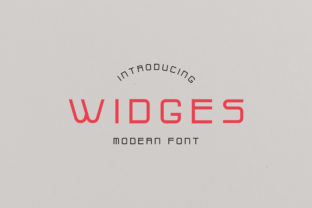
Widges is a modern slab serif typeface designed with restraint and intention. It avoids the exaggerated weight or geometric rigidity sometimes associated with contemporary slab serifs, instead offering clean lines, open apertures, and subtle contrast between thick and thin strokes. Its letterforms balance structural clarity with a light, approachable charm—making it especially effective where readability meets personality.
What Sets Widges Apart From Other Slab Serifs
Slab serifs as a category span a wide spectrum—from bold display fonts like Rockwell to minimalist interpretations like Courier Prime or Roboto Slab. Widges occupies a distinct middle ground. It’s not intended for high-impact headlines demanding immediate attention, nor is it optimized for dense body text in long-form publishing. Instead, Widges excels in contexts that benefit from quiet authority: product interfaces, editorial sidebars, brand voice systems, and visual identities that value consistency over contrast.
Its x-height is generous without being overwhelming, supporting legibility at smaller sizes while retaining warmth in larger applications. The terminals are cleanly cut—not blunt, not flared—giving letters a grounded but unobtrusive presence. Unlike many slab serifs with pronounced stroke modulation, Widges uses restrained contrast, which helps it scale smoothly across digital interfaces and print collateral alike.
Where Widges Fits in Real-World Design Workflows
Designers often reach for slab serifs when they need typographic stability paired with a touch of character. Widges answers that need without tipping into stylistic dominance. For example, a SaaS dashboard might use Widges for labels and status tags—its even rhythm supports scanning, while its slight softness prevents visual fatigue during extended use. In a lifestyle brand’s website, Widges could serve as a secondary font alongside a neutral sans serif, handling pull quotes or feature headings with understated confidence.
It also performs well in mixed-font pairings. Because Widges doesn’t compete for attention, it complements humanist sans serifs (like Inter or Lato) or even low-contrast serifs (such as Charter or Literata) without clashing. Its spacing is thoughtfully tuned—not overly tight, not loose—so it integrates naturally into responsive layouts without requiring heavy manual adjustment.
Strengths Worth Noting
- Legibility at moderate sizes: Performs consistently from 14px to 36px on screen, making it practical for UI components, captions, and short-form editorial text.
- Neutral but expressive tone: Conveys professionalism without coldness, friendliness without informality—a useful middle path for brands avoiding extremes.
- Light optical weight: Even in its regular weight, Widges feels airy, reducing visual density in interfaces where content hierarchy relies more on layout than typographic contrast.
- Cross-platform consistency: Designed with modern rendering engines in mind, it holds up well on Windows, macOS, iOS, and Android without significant hinting compromises.
Tradeoffs and Practical Limitations
No font excels in every context—and Widges is no exception. Its deliberate simplicity means it lacks the dramatic flair needed for luxury branding or high-energy campaigns. If your project depends on strong visual distinction—say, a fashion magazine cover or a music festival poster—Widges may read as too reserved. Similarly, its limited weight range (typically Regular, Medium, and Bold, without ultra-light or black variants) restricts fine-grained typographic hierarchy in complex documents.
Long-form reading presents another consideration. While Widges is readable in short paragraphs, its slab structure and uniform stroke weight don’t provide the same eye-guiding rhythm as traditional transitional or old-style serifs (like Georgia or Merriweather). For articles exceeding 500 words or multi-page reports, pairing it with a dedicated text face—or choosing a more nuanced serif altogether—often yields better results.
Comparing Approaches: When to Choose Widges (and When Not To)
Choosing Widges isn’t about finding the “best” slab serif—it’s about matching intent to execution. Consider it when:
- You’re building a digital product where typography supports function first, expression second.
- Your brand voice values clarity, calm, and consistency over theatricality or nostalgia.
- You need a slab serif that works alongside a versatile sans serif without competing for attention.
- You’re designing for mixed audiences—e.g., B2B tools used by both technical and non-technical users—and want to avoid stylistic assumptions.
Conversely, look elsewhere if:
- Your project demands strong historical resonance (e.g., newspaper mastheads, academic journals), where traditional serifs offer deeper cultural alignment.
- You require extensive language support beyond Latin-based scripts—Widges typically covers Western European languages thoroughly, but may lack full Cyrillic, Greek, or extended diacritic coverage out of the box.
- You’re working under tight performance constraints and need a highly compressed web font file—Widges prioritizes typographic integrity over minimal byte count, so it may be larger than stripped-down system alternatives.
- Your design system already relies on a robust, multi-weight serif family; introducing Widges may add redundancy rather than value.
Realistic Pairing Examples
Widges gains clarity when seen in context. Here are three practical pairings—each reflecting different goals:
- With Inter (Regular + Widges Medium): A common choice for dashboards and admin panels. Inter handles navigation and data labels; Widges adds gentle emphasis to section headers and status indicators—creating hierarchy through role, not contrast.
- With Source Serif Pro (Regular + Widges Bold): Useful for hybrid editorial sites—Source Serif Pro carries long-form articles, while Widges Bold introduces visual punctuation for subheadings and callouts without disrupting flow.
- With a monospace (e.g., JetBrains Mono): Effective in developer-facing documentation. Monospace handles code samples; Widges provides accessible, friendly headings and explanatory text—bridging technical precision and approachability.
Making an Informed Choice
Selecting a typeface like Widges is rarely about aesthetics alone. It’s about how well its behavior aligns with your project’s functional needs, audience expectations, and long-term maintainability. Ask yourself: Does this font help users move through information more easily? Does it reflect the tone you intend—without requiring explanation? Will it hold up across devices, updates, and team members who may not share your typographic instincts?
Widges shines when those questions point toward subtlety, coherence, and quiet reliability. It won’t shout—but it will hold space with purpose. That makes it especially valuable for designers who understand that sometimes the most effective typography is the kind people don’t notice, because it simply works.
If you’re evaluating options, test Widges alongside your current leading candidates—not just at headline size, but in real interface mockups, at actual reading distances, and with real content. See how it behaves with your color palette, spacing system, and user tasks. Typography decisions solidify quickly in production; investing time in contextual testing pays off in consistency, accessibility, and reduced revision cycles down the line.