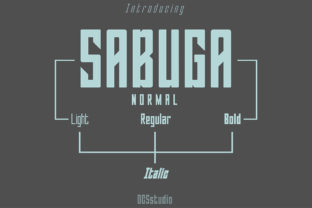
Sabuga: A Bold, Simple Sans Serif That Works—When Used Right
Sabuga isn’t just another sans serif font—it’s a confident, clean typeface with quiet authority. Its bold charm comes from balanced proportions, open counters, and a subtle warmth that avoids sterility. Designers, marketers, educators, and small business owners often reach for Sabuga when they need clarity without compromise: a logo that stands out on a café sign, a presentation slide that holds attention in a Zoom room, or a blog header that feels both modern and approachable.
Why Sabuga Appeals—and Where Assumptions Go Off Track
Many people download Sabuga thinking its simplicity means it’s “plug-and-play.” That’s understandable—but oversimplifying how it behaves can backfire. Sabuga’s strength lies in intentionality, not invisibility. It doesn’t fade into the background like neutral fonts (think Inter or Roboto); instead, it carries presence. That makes it powerful—but also more sensitive to context.
A common misstep? Using Sabuga at small sizes for body text. Its generous x-height and strong stroke contrast work beautifully at 18pt+ for headings or short labels—but below 14pt, especially on lower-resolution screens or in long paragraphs, letterforms can feel crowded or slightly heavy. Readers don’t always know why they’re skimming past your newsletter; sometimes, it’s Sabuga doing too much, too soon.
Mistake #1: Ignoring Line Height and Letter Spacing
Sabuga benefits from thoughtful spacing—not default settings. Its boldness amplifies tight tracking. Set letters too close together in a headline, and “Sabuga” itself can look visually dense (“Sabuga”) rather than crisp. Similarly, default line height often undercuts readability in multi-line use cases—like testimonial quotes or feature lists.
Better approach: For display use (headings, logos, banners), add 2–5% extra letter spacing. For body copy—even short blurbs—aim for 1.4–1.6 line height. Test on real devices: a Sabuga-powered landing page may look sharp on your desktop but feel cramped on mobile if spacing isn’t adjusted responsively.
Mistake #2: Assuming All Weights Are Equally Versatile
Sabuga typically ships with Regular, Medium, Bold, and sometimes Extra Bold weights. But not all weights render equally across platforms. On some older Android versions or certain CMS editors (like basic WordPress block editors), the Medium weight may fallback to Regular—or worse, substitute with system fonts entirely. That breaks visual hierarchy and weakens messaging.
You don’t need every weight—just the right ones for your workflow. If you’re building a brand kit, prioritize Bold (for headlines) and Regular (for supporting text). Use Medium only where contrast is essential *and* you’ve confirmed cross-platform consistency. Skip Extra Bold unless you’re designing large-format print or high-contrast digital signage—its impact diminishes at smaller scales.
Mistake #3: Overlooking Licensing in Real-World Use
Sabuga is often offered under free licenses—but those vary. Some versions permit personal use only. Others allow commercial projects but prohibit redistribution (e.g., bundling Sabuga inside a SaaS dashboard your clients access). Still others require attribution in open-source projects.
This isn’t bureaucracy—it’s risk management. Imagine launching a client’s e-commerce site using a Sabuga variant labeled “free for personal use,” only to receive a polite but firm notice months later. The fix isn’t just swapping fonts—it’s revisiting design files, updating CSS, re-exporting assets, and explaining the delay.
Before downloading or purchasing: Check the license file—not just the download page headline. Look for clear terms around web embedding (WOFF/WOFF2), app usage, and resale restrictions. Reputable sources (like Google Fonts, Adobe Fonts, or the designer’s official site) list these transparently. When in doubt, email the foundry. Most respond within 48 hours—and that 5-minute check prevents hours of rework.
Mistake #4: Pairing Without Purpose
Because Sabuga feels self-assured, it’s tempting to pair it with other “strong” fonts—say, a dramatic serif or a geometric sans. But contrast needs direction, not competition. Sabuga + Playfair Display can clash if both are set bold and large; the result feels busy, not balanced.
A more reliable pairing strategy? Choose one axis of contrast: form (serif/sans), weight (light/bold), or scale (tight/loose). Sabuga pairs elegantly with a low-contrast, humanist serif like Lora (form contrast) or a delicate, airy sans like Poppins Light (weight + scale contrast). Try setting Sabuga Bold at 32px for headings and Lora Regular at 18px for paragraphs—then adjust line height to unify rhythm.
What to Test Before You Commit
Don’t rely on font previews alone. Run these quick checks before finalizing Sabuga for a project:
- Legibility test: Paste two sentences—one in Sabuga, one in your current font—into a dark-mode browser window at 100% zoom. Which feels easier to read after 10 seconds?
- Brand alignment check: Print your logo mockup at actual size (e.g., 2” wide for a business card). Does Sabuga still feel appropriate next to your color palette and imagery—or does it dominate unintentionally?
- Performance scan: If using Sabuga on a website, run Lighthouse. A single WOFF2 file under 40KB usually has negligible impact—but loading three weights plus italics can bloat load time, especially on slower connections.
Final Thought: Sabuga Rewards Thoughtful Use
Sabuga doesn’t ask for complexity—it asks for attention. It’s not a “set and forget” font, but that’s its advantage. When you adjust spacing, verify licensing, choose weights deliberately, and test across contexts, Sabuga delivers something rare: distinction without distraction. It helps your message land—not because it shouts, but because it’s clear, consistent, and quietly confident.
That confidence transfers to your audience. Whether you’re a freelancer choosing a portfolio font, an educator designing handouts, or a small shop owner updating social graphics—Sabuga works best when it serves your goal, not your assumptions. Start small: pick one use case, apply one adjustment (like increased letter spacing), and see how it changes perception. Then build from there.