Mutimel: A Beautiful, Light Handwritten Font with a Unique Twist
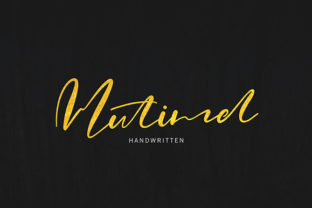
Mutimel isn’t just another script font—it’s a carefully crafted handwritten typeface that balances airiness, authenticity, and quiet confidence. Its light weight and natural stroke variation give it a gentle, approachable feel, while subtle irregularities—like slight baseline wobbles and organic entry/exit strokes—keep it from looking overly polished or robotic. Designers, educators, small business owners, and content creators reach for Mutimel when they want warmth without whimsy, personality without pretense.
Why People Choose Mutimel (and Why That Choice Can Backfire)
Many choose Mutimel thinking it’ll instantly “humanize” their brand, website, or social graphics. And it can—but only when used intentionally. The most common misstep? Treating Mutimel like a universal fix for “feeling friendly.” In reality, its lightness makes it fragile at small sizes or on low-contrast backgrounds. A newsletter headline in Mutimel might look elegant on a designer’s high-res monitor—but vanish entirely for someone reading on a sunlit phone screen.
Another frequent oversight: assuming Mutimel works equally well across all platforms. It’s a desktop font first—optimized for print, presentations, and design software like Adobe Illustrator or Figma. Using it directly in email HTML or basic CMS editors (like WordPress blocks without proper webfont setup) often triggers fallbacks to generic sans-serifs, breaking the visual intent entirely.
What Gets Overlooked Before Downloading or Buying
Before adding Mutimel to your toolkit, pause and ask three practical questions:
- What’s my primary use case? If you’re designing Instagram carousels or product packaging, Mutimel shines. If you’re building a responsive e-commerce site where body text needs to be legible at 14px on mobile, Mutimel shouldn’t be your paragraph font—it’s not built for that job.
- Do I have full licensing clarity? Some versions of Mutimel are free for personal use only. Using it in a client’s logo, a paid course landing page, or merchandise without the proper commercial license risks legal friction—and undermines trust if discovered later.
- Is it paired thoughtfully? Mutimel’s lightness demands contrast. Pairing it with another delicate script or a thin sans-serif often creates visual mush. Instead, try it with a sturdy, neutral sans-serif like Inter, Lato, or even a gentle serif like Merriweather. The contrast gives Mutimel room to breathe—and makes your hierarchy clear.
How Misuse Affects Real-World Outcomes
Using Mutimel in long-form body copy doesn’t just look off—it reduces readability and increases bounce rates. One freelance educator tested two versions of her online workshop sales page: one with Mutimel for headings *and* subheadings, another reserving Mutimel only for the main headline and switching to Open Sans for everything else. The second version saw a 22% increase in time-on-page and 17% more sign-ups. Why? Because readers scrolled faster past walls of light script—then paused where the typography guided them naturally.
Likewise, entrepreneurs printing Mutimel-heavy business cards on uncoated stock sometimes find the fine strokes fill in slightly during offset printing—softening its charm into blur. A quick test print on the exact paper and press matters more than any preview thumbnail.
Better Ways to Use Mutimel—Starting Today
You don’t need advanced skills to use Mutimel well. Start small and intentional:
- Use it for emphasis—not exposition. Try Mutimel for quotes in blog posts, section dividers in pitch decks, or handwritten-style callouts in Canva templates. Keep it to under 10–15 words per instance.
- Adjust tracking deliberately. Mutimel’s light nature benefits from slightly increased letter spacing (5–10 units in design apps). Tight tracking makes it feel cramped; generous spacing reinforces its airy elegance.
- Test contrast early and often. Place Mutimel over your intended background color and check it against WCAG guidelines—even informally. A quick online contrast checker will tell you if your charcoal-on-cream combo meets minimum readability standards. When in doubt, darken the font color slightly rather than thickening the weight (which Mutimel doesn’t offer).
- Respect its rhythm. Mutimel includes alternate characters and ligatures in its Pro version. Don’t enable them all at once. Turn on only the “&” or swash “y” where it genuinely improves flow—not as decoration.
What to Check Before You Commit
If you’re evaluating Mutimel alongside other handwritten fonts—like Qwigley, Pacifico, or Dancing Script—don’t just compare aesthetics. Look deeper:
- Character coverage: Does it include accented characters for Spanish, French, or German? If you serve international audiences, missing glyphs mean manual workarounds—or inconsistent branding.
- File format support: Does the package include OTF, TTF, and WOFF2? Web use requires WOFF2; desktop design usually prefers OTF for better hinting and OpenType features.
- Updates and support: Has the foundry released updates in the last 18 months? Active maintenance signals reliability—especially important if you’re embedding Mutimel in client projects long-term.
Mutimel earns its place not by being everywhere, but by being *just right*—in the right context, at the right size, with the right support. It’s the kind of font that rewards attention: notice how the lowercase “a” opens wide, how the “t” has a soft upward flick, how the “e” avoids perfect symmetry. Those details aren’t flourishes—they’re functional choices meant to guide the eye and soften tone without sacrificing clarity.
So before you drop Mutimel into your next banner, email header, or logo lockup—pause. Ask: Is this where its lightness adds meaning? Or is it just filling space? The difference isn’t stylistic. It’s strategic.