Sign Language Font
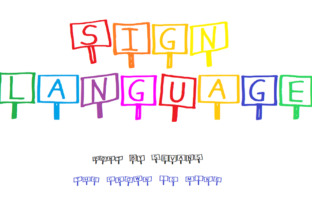
Sign Language is a decorative typeface designed with playful, hand-drawn aesthetics—featuring rounded forms, subtle irregularities, and gentle curves that evoke the expressiveness of gesture and movement. Despite its name, it is not related to linguistic sign systems used by Deaf communities; rather, it’s a display font intended for visual appeal in contexts where charm, approachability, and light-hearted personality matter.
What Sign Language Actually Is
Sign Language is a commercially available digital font, classified as a script or handwritten-style typeface. It includes uppercase and lowercase letters, numerals, and basic punctuation. Its design intentionally avoids mechanical precision: strokes vary slightly in weight, terminals taper organically, and letterforms lean or bounce gently—creating a sense of warmth and spontaneity. It supports standard Latin character sets and is typically distributed in OpenType (.otf) or TrueType (.ttf) formats.
Why Designers Consider Sign Language
Designers often explore Sign Language when seeking a font that conveys friendliness without sacrificing legibility at larger sizes. Common use cases include branding for children’s products, boutique packaging, social media graphics, event invitations, and web headers where tone matters as much as typography. Its “cute twist” makes it stand out among more generic script fonts—but that distinctiveness also demands careful evaluation.
Benefits of Using Sign Language
- Strong visual personality: It adds immediate character to headlines, logos, or short phrases—especially where brand voice leans toward whimsy, care, or playfulness.
- Good readability at display sizes: When used above 36pt (or scaled appropriately on screen), letterforms remain clear and well-spaced.
- Consistent stylistic cohesion: Unlike some hand-lettered fonts that mix inconsistent weights or proportions, Sign Language maintains balanced rhythm across the alphabet.
- Widely compatible: Works reliably in major design tools (Adobe Creative Cloud, Figma, Affinity Suite) and modern browsers when embedded via @font-face or system fallbacks.
Tradeoffs and Limitations
While expressive, Sign Language is not suited for all typographic needs. Its decorative nature introduces constraints:
- Poor performance in body text: Low contrast, modest x-height, and connected or tapered strokes reduce legibility below ~24pt—making it unsuitable for paragraphs, UI labels, or long-form reading.
- Limited language support: Most versions cover Western European languages only. Accented characters for French, Spanish, or Polish may be present but are not always thoroughly tested; extended Cyrillic, Greek, or non-Latin scripts are generally unsupported.
- Spacing challenges in tight settings: Kerning pairs are optimized for headline use—not dense layouts like tables, captions, or navigation menus—so manual adjustments may be needed.
- Licensing considerations: Like many decorative fonts, usage rights vary by vendor. Web embedding often requires a separate license, and redistribution (e.g., in templates or apps) may be restricted.
When Sign Language Fits Well
Consider Sign Language if your project prioritizes emotional resonance over functional neutrality—and if technical constraints align:
- You’re designing a logo or wordmark for a brand centered on joy, creativity, or nurturing (e.g., an art camp, handmade soap line, or early-education app).
- Your layout uses it sparingly: as a single-line headline, a short tagline, or within a hero section where it appears large and isolated.
- Your audience is likely to interpret its tone positively—such as families, educators, or consumers drawn to artisanal or indie aesthetics.
- You have control over rendering environment (e.g., static PDFs, controlled web pages, or branded presentations) and can ensure appropriate sizing and contrast.
When Alternatives May Be Better
Sign Language becomes less practical—and potentially counterproductive—in these scenarios:
- Accessibility-critical interfaces: If your interface must meet WCAG contrast or readability standards (e.g., government services, health portals), a highly decorative font like Sign Language will likely fall short—even with sufficient color contrast—due to shape ambiguity and low stroke differentiation.
- Multilingual or global projects: If your content regularly includes diacritics, non-Latin scripts, or right-to-left languages, you’ll need broader character coverage than Sign Language typically offers.
- High-density information design: Dashboards, data reports, or documentation benefit from neutral, highly legible typefaces (e.g., Inter, Roboto, or Source Sans). Sign Language’s personality distracts from clarity in those contexts.
- Brand systems requiring typographic hierarchy: If you need a full family (light, regular, bold, italic) to establish visual structure, Sign Language—typically offered in one weight—won’t scale functionally. Pairing it with a robust sans-serif for supporting text helps, but doesn’t replace structural flexibility.
Practical Decision-Making Guidance
Evaluating Sign Language isn’t about whether it’s “good” or “bad”—it’s about fit. Start by clarifying your core requirement: Is this font solving a communication goal, or a stylistic one?
If the goal is to convey warmth and memorability in a limited, high-impact context, preview Sign Language alongside real content—not just “The quick brown fox.” Test how it renders with your actual copy length, background colors, and target devices. Check contrast ratios using free tools like WebAIM’s Contrast Checker, and verify spacing in responsive breakpoints.
Compare it against alternatives with similar intent but different constraints—for example, Quicksand (friendly yet more versatile), Caveat (free, open-source, and script-like but with better language support), or Comic Neue (playful but engineered for readability). Each trades off personality for practicality in distinct ways.
Finally, assess licensing upfront. Some vendors offer trial versions with watermarks or limited character sets—use those to validate compatibility before purchase. If you’re working in collaborative environments (e.g., shared Figma files or CMS-driven sites), confirm team access and deployment permissions match your workflow.
Final Considerations
Sign Language works best when treated as a deliberate accent—not a default. Its value lies in intentionality: choosing it signals a conscious decision to prioritize mood and identity over neutrality. That makes it powerful in the right setting, but limiting if applied without scrutiny. As with any decorative font, success depends less on the typeface itself and more on how thoughtfully it serves both audience expectations and functional requirements.
Before committing, ask: Does this font help users understand, engage with, or remember the message—or does it risk slowing them down? If the answer aligns with your goals, Sign Language can be a thoughtful, effective choice. If not, exploring alternatives with similar spirit but broader utility may yield stronger long-term results.