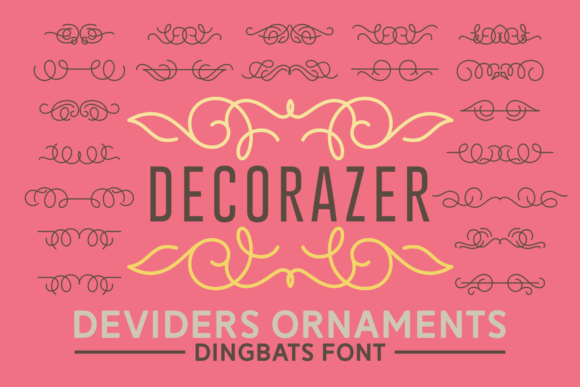
Decorazer: A Romantic Dingbats Font That Elevates Everyday Design
Decorazer isn’t just another decorative font—it’s a collection of hand-crafted ornaments, flourishes, and delicate dingbats that breathe quiet romance into digital and print projects. Think of it as your secret ingredient for adding warmth, elegance, and intentionality without saying a word. Designed with soft curves, balanced negative space, and subtle asymmetry, Decorazer feels both timeless and refreshingly personal—like finding vintage lace in a modern stationery shop.
Where Decorazer Fits Naturally (and Why It Stands Out)
Most dingbats fonts lean either too clinical (geometric, minimalist) or overly ornate (baroque, Victorian). Decorazer lives comfortably in the middle: expressive but never overwhelming, detailed but never fussy. That balance makes it unusually versatile across real-life creative needs—not just “pretty,” but practically useful.
Wedding & Event Design: Subtle Storytelling
Couples planning intimate weddings often want elegance without formality—and Decorazer delivers exactly that. Use its floral motifs to frame names on save-the-dates, tuck tiny vine borders beneath menu headings, or scatter delicate dots and swirls along the edge of a ceremony program. Unlike script fonts that demand perfect kerning or legibility compromises, Decorazer’s dingbats work beautifully at small sizes (8–12 pt) and pair effortlessly with clean sans-serifs like Montserrat or Lora. One designer shared how she used Decorazer’s crescent and petal glyphs to create a custom monogram for a couple’s napkin embroidery—no vector editing needed, just smart font substitution.
Small-Business Branding: Personality Without Overdesign
Artisan bakeries, ceramic studios, botanical apothecaries, and independent bookshops all share something: they sell more than products—they sell atmosphere. Decorazer helps translate that feeling into visual language. A café might use its leaf motif as a bullet point in Instagram bios or email footers; a candle maker could embed its soft flame glyph into packaging seals or QR code labels. Because Decorazer includes over 120 unique glyphs—including stars, ribbons, hearts, and abstract organic shapes—it offers variety without visual clutter. And since it’s OpenType-enabled, many design apps let you access alternate glyphs with a single click—ideal when you want variation across social posts or product tags.
Digital Content & Social Media: Warmth in a Scroll
In an algorithm-driven feed full of bold headlines and saturated colors, Decorazer adds gentle contrast. Try using its dot-and-dash divider (•—•) between blog section headers, or layer its scalloped border behind a quote graphic for Pinterest. It works especially well in Canva, Figma, and Adobe Express—no advanced typography knowledge required. Just type a standard character (like “*” or “~”) and swap it out via glyph panel. Bonus: because Decorazer avoids heavy serifs or sharp angles, it renders crisply on mobile screens—even at 14 px in email clients where web fonts often fail.
Who Benefits Most—and How They Use It Differently
- Handmade sellers on Etsy: Use Decorazer to design printable gift tags, packaging inserts, or seasonal promo banners—keeping branding cohesive without hiring a designer every time.
- Teachers & homeschoolers: Add charm to lesson plans, classroom posters, or student certificates. Its gentle shapes feel inviting—not childish—making it ideal for middle school through adult education materials.
- Bloggers & content creators: Break up long-form text with thematic dividers (e.g., a sprig of lavender for garden posts, a feather for writing tips) that reinforce voice without distracting from substance.
- Print-on-demand designers: Layer Decorazer glyphs over neutral backgrounds for greeting cards, journals, or wall art—low-risk experimentation since dingbats scale cleanly and rarely require licensing upgrades.
Things to Keep in Mind Before You Start Using Decorazer
Like any specialized tool, Decorazer shines brightest when matched thoughtfully to the job. Here’s what seasoned users notice early on:
- It’s not a text font. Decorazer has no letters or numbers—just ornaments. So if you’re hoping to set body copy or headlines with it, you’ll need a strong companion font. Pair it with something airy and legible (like Nunito, Playfair Display, or even system fonts like Georgia) to keep hierarchy clear.
- Less is often more. Because each glyph carries emotional weight, overusing them dilutes impact. One wedding invitation suite used Decorazer only three times: a single blossom beside the couple’s names, two mirrored leaves framing the date, and a tiny ribbon knot at the bottom. That restraint made each instance feel intentional—and memorable.
- Check your software compatibility. While Decorazer works in most modern design tools (including Google Fonts-compatible platforms), older versions of Microsoft Word or Pages may limit glyph access. If you rely heavily on those, test a few characters first—or stick to apps with full OpenType support (like Affinity Designer or Illustrator).
- Consider color and contrast carefully. Its fine lines and delicate shapes can vanish on busy backgrounds or low-contrast combos. When in doubt, try it at 200% size first, then scale down once spacing and clarity are confirmed.
Why Decorazer Feels Like a Quiet Upgrade
There’s a reason so many designers return to Decorazer again and again—not because it solves huge technical problems, but because it quietly solves human ones. It softens harsh layouts. It adds sincerity to promotional graphics. It helps small brands feel considered, not generic. One freelance illustrator told us she uses Decorazer’s wavy line glyph as a “pause mark” between client feedback rounds—subtle, non-verbal, and surprisingly effective at signaling transition and care.
And unlike trend-driven fonts that fade after a season, Decorazer’s romantic charm doesn’t shout—it lingers. It works whether you’re designing a birth announcement, a boutique website header, or a simple thank-you note scanned into a PDF. It doesn’t ask for attention. It earns it.
If you’ve ever hesitated before adding “just one more decorative element” for fear of crossing into clutter, Decorazer might be the gentle nudge you’ve been waiting for—a beautiful dingbats font that doesn’t compete, but complements; doesn’t distract, but deepens.